Enter the boiler's capacity.The drawing and the calculation follow.
ThermoForm is design software for Scotch-type steam boilers, hot-water boilers and pressure vessels. You enter the order's capacity and pressure; the program sizes the boiler to EN 12953-3 and EN 13445-3, runs the checks, and produces the report, the formula-driven Excel workbook and the drawing sheet from the same calculation.
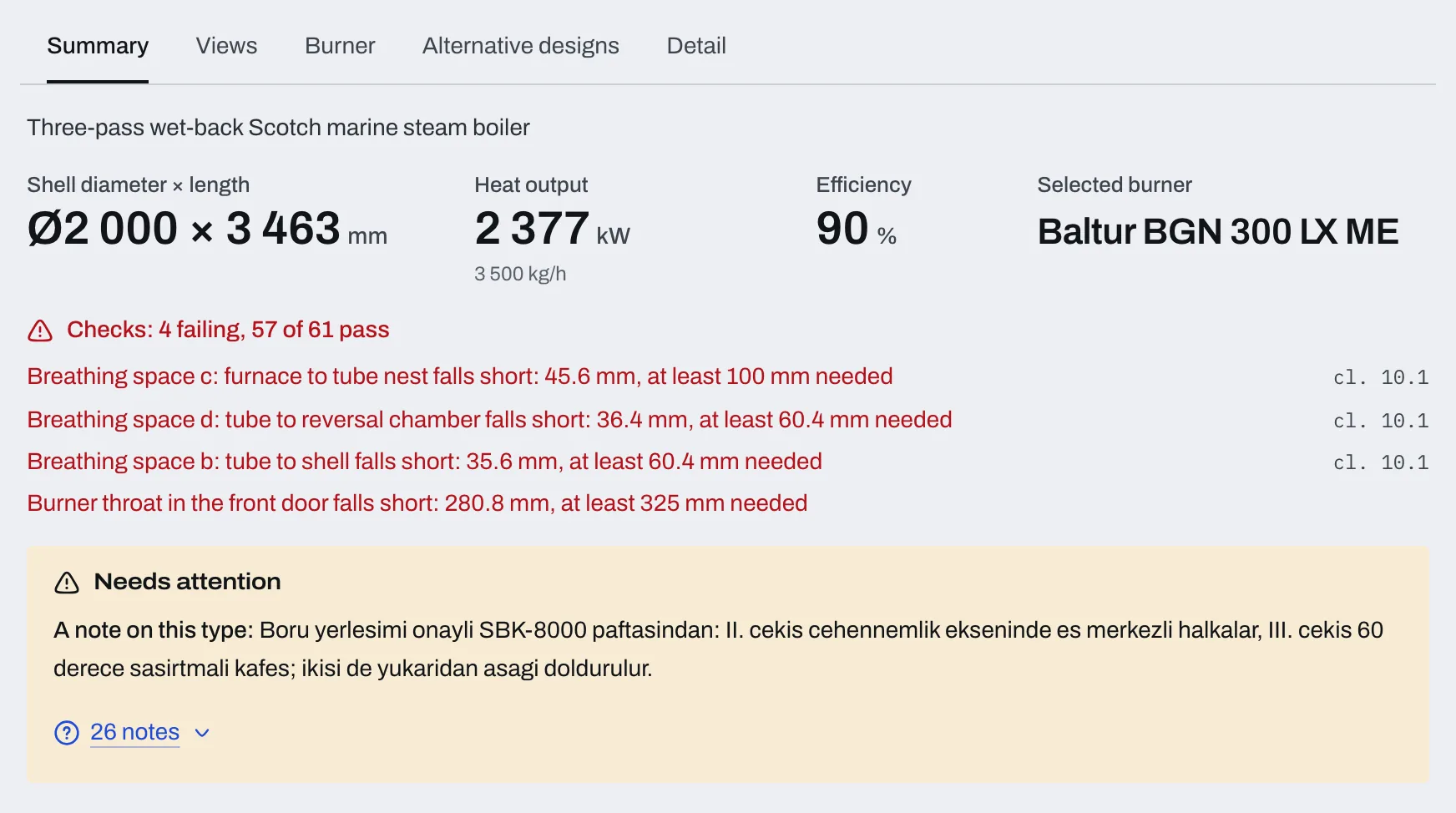
The program's example order: a three-pass wet-back Scotch steam boiler
- Order
- 3 500 kg/h, 3 bar
- Shell
- Ø 2 000 × 3 463 mm
- Heat output
- 2 377 kW
- Efficiency
- 90%
- Burner
- Baltur BGN 300 LX ME
- Checks
- 61
It starts with three values and ends with a boiler.
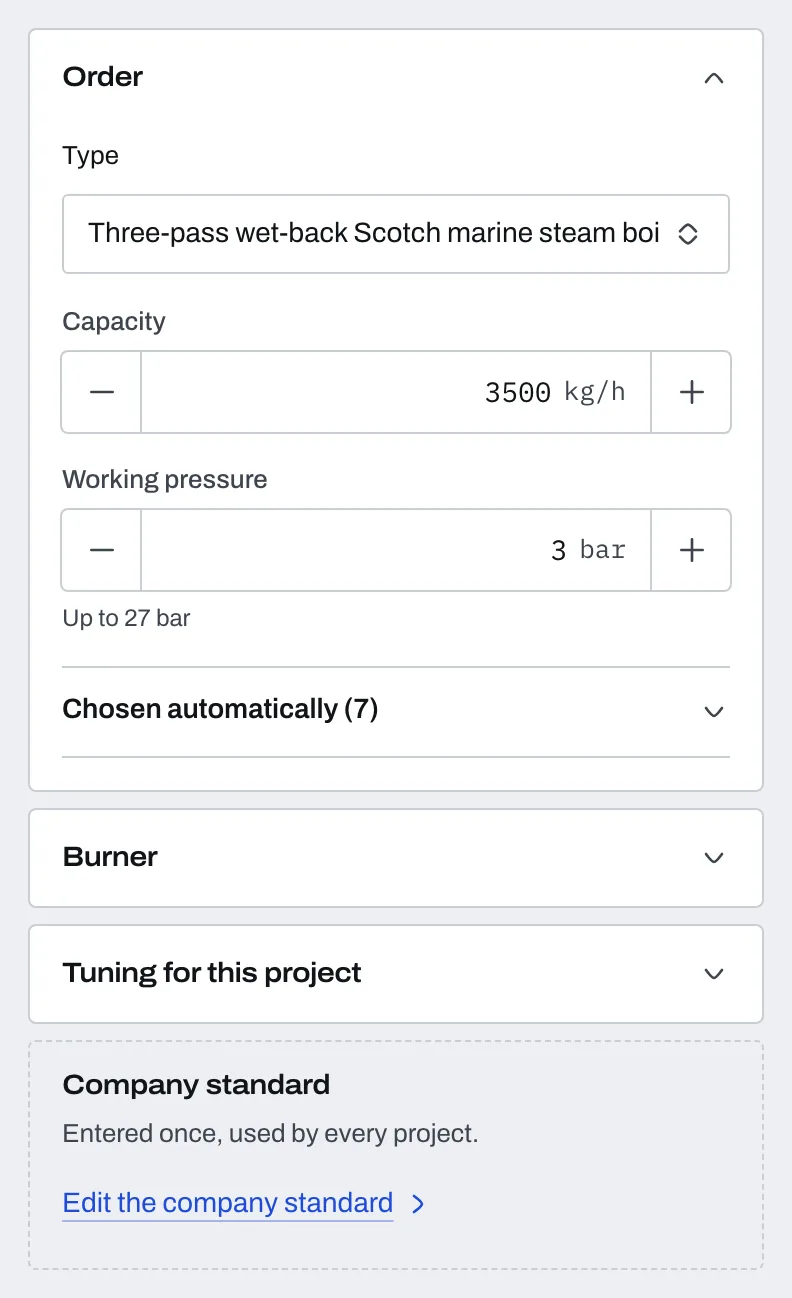
You enter the type, the capacity and the working pressure. The program proposes the rest, and you change whatever you would do differently.
- 01
Enter the order
Type, capacity and working pressure. The program makes seven choices, such as the fuel, the feedwater temperature and the material, and you can change any of them.
- 02
The program chooses and checks
It picks the shell diameter, the length, the number of tubes and the burner, then runs the EN 12953-3 checks one by one. If one fails, you see it on the first screen, in a sentence.
- 03
Take the outputs
A text report, an Excel workbook with its formulas open, a DXF drawing sheet with views A, B, C and D, and the parts list. Your name is in the title block.
Every check is written with the clause of the standard it rests on.
The program writes every check with its clause and marks it as passing or failing. The engineer who approves the design sees what was checked against what.
| Standard | Covers |
|---|---|
| EN 12953-3:2016 + AC:2024 | Fire-tube boilers. The calculation was compared clause by clause with the licensed text. |
| EN 13445-3 + PED 2014/68/EU | Pressure vessels, and the vessel's PED category. |
| EN 1993-1-8 | Saddles and lifting lugs. |
| EN ISO 4126-1 + EN 12953-8 | The safety valve. |
| EN 12953-5 | The inspection plan. |

- Boiler types
- 7
- steam, hot water, high-temperature hot water, waste heat
- Vessel types
- 9
- from the air receiver to the steam header
- Burner models
- 148
- from manufacturers' datasheets, with working-area curves
- Checks
- 61
- on the example boiler, each with its clause
- Note
- ThermoForm is a preliminary design tool. Results must be confirmed by a qualified engineer and against current legislation before anything is built. Catalogue figures are indicative.
The report, the Excel workbook and the drawing come from the same calculation.
The calculation you approve becomes three documents. They come from the same numbers, so they agree with each other, and each one carries the program version and the edition of the standard.
- Text report
- The calculation item by item, each with the clause it follows.
- Calculation book (Excel)
- Formulas open. 17 sheets for a boiler, material and inspection included; 10 for a pressure vessel.
- DXF drawing sheet
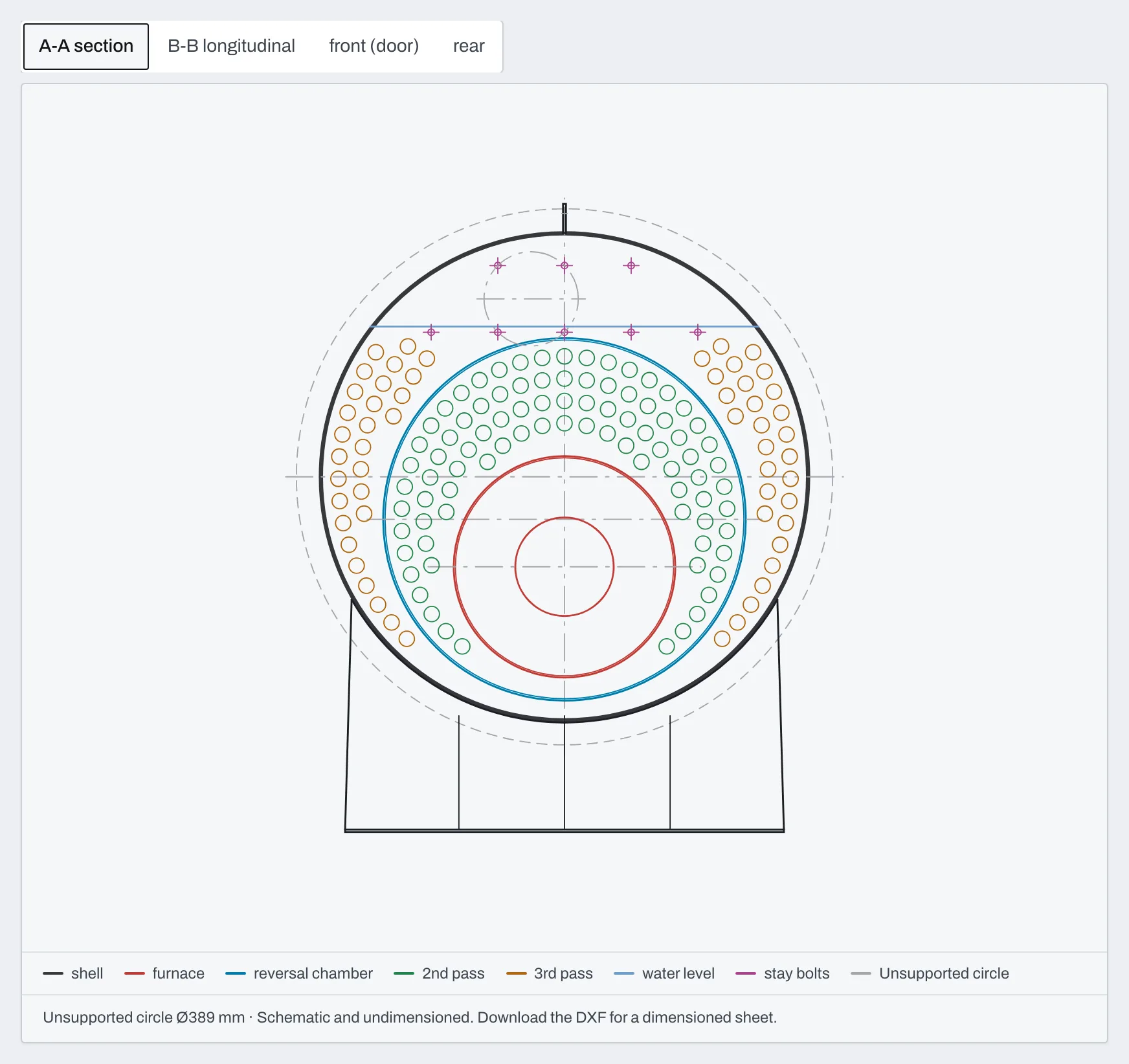
- R2000, with views A, B, C and D, the parts list and the title block.
- Traceability stamp
- The program version and the edition of the standard on every output. Two outputs with the same stamp are identical.
Output language
The report, the Excel workbook and the drawing sheet are produced in Turkish today; English and German outputs are on the way.
You enter your company standard once, and every project starts from it.
Every manufacturer makes decisions the program cannot know: the tube pitch, the weld allowance, the plate kept in stock. You enter them once. Every document that reaches your customer carries your name.
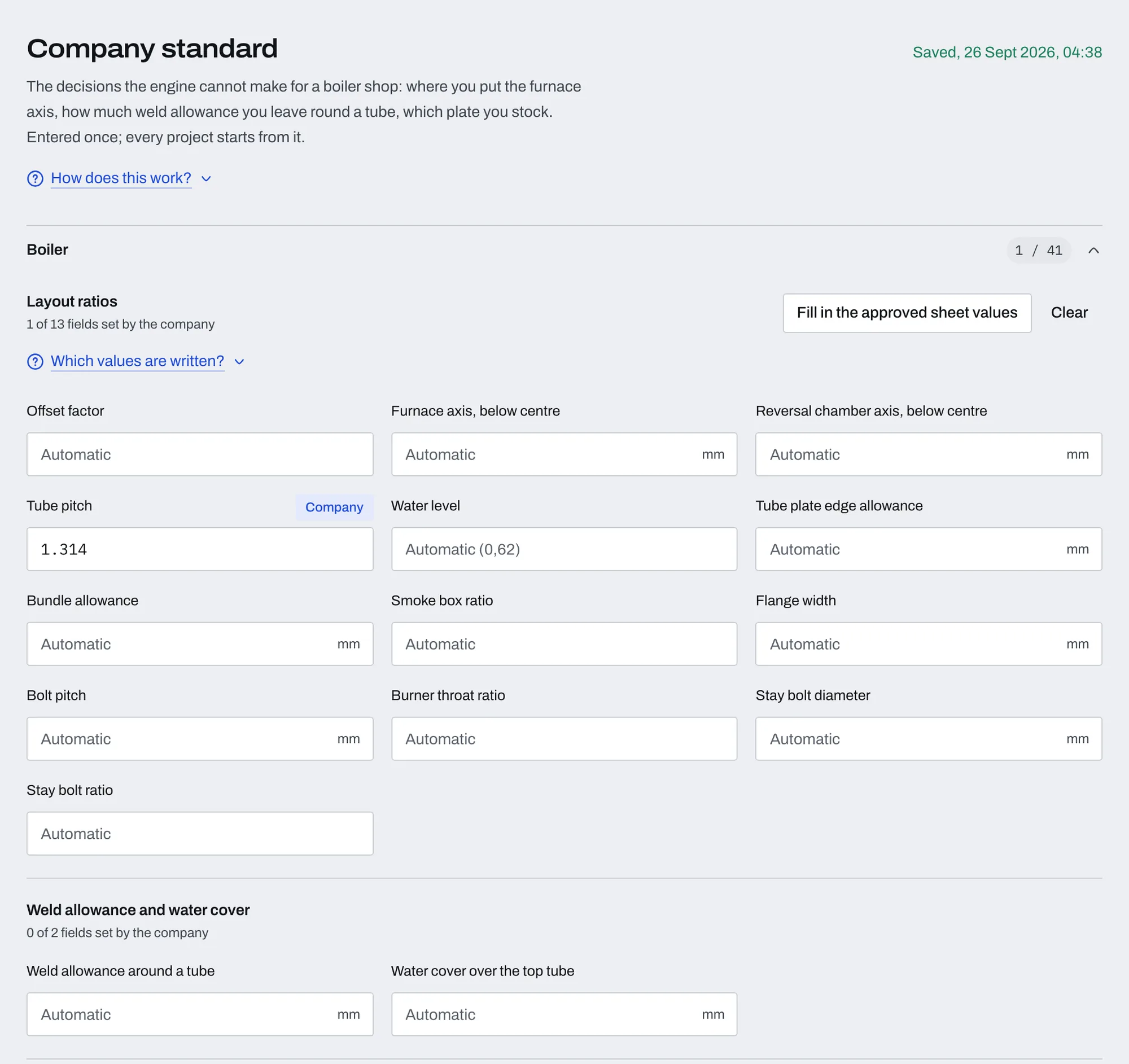
The company standard is entered once.
Tube pitch, weld allowances, stock plate, saddle and lug. A field you fill is used in every new project; a field you leave empty is chosen by the program each time.
The burners come from your catalogue.
Upload your own dealer list and the manufacturer's flame diagram as CSV. Without them the program uses its catalogue of 148 models from the datasheets.
You decide who designs and who downloads.
You add the users and give each one permissions: boiler design, pressure vessel design, report, Excel and DXF downloads, the company standard.
Your name is in the title block.
Your logo and company name appear in the bottom right corner of the drawing sheet and on the cover of the report. Our name is on nothing that reaches your customer.
Already a customer?
Your company opens at app.thermoform.fabrikode.com. Sign in with the address we set up for you.
See ThermoForm with your own order.
Tell us who you are and what you build. We set up a call and calculate one of your orders together. The form takes about a minute.
Who it is for
Boiler manufacturers and the engineering offices that design for them. In the demo we calculate your own order.
Someone from our team usually gets back to you within 24 hours, at most 3 working days. We do not pass your details to anyone and we do not add you to a mailing list.
Frequently asked questions
- Which boilers and vessels does it design?
- Seven boiler types: the three-pass wet-back Scotch steam boiler, the two-pass dry-back economy steam boiler, the reverse-flame steam boiler, the solid-fuel steam boiler with a fore-furnace, the three-pass high-temperature hot-water boiler (110 to 200 °C), the three-pass hot-water boiler (below 110 °C) and the waste-heat boiler without a furnace. Nine pressure vessel types: air receiver, expansion vessel, deaerator, blowdown vessel, condensate tank, flash vessel, calorifier, hydrophore tank and steam header.
- Which standards does it calculate to?
- Boilers to EN 12953-3:2016 + AC:2024, compared clause by clause with the licensed text. Pressure vessels to EN 13445-3, with their PED 2014/68/EU category. Saddles and lifting lugs to EN 1993-1-8, the safety valve to EN ISO 4126-1 and EN 12953-8, and the inspection plan to EN 12953-5.
- Who approves the results?
- A qualified engineer. ThermoForm is a preliminary design tool: results must be confirmed by a qualified engineer and against current legislation before anything is built. Every check is written with its clause, so the engineer sees what was checked against what. Conformity assessment, inspection and operating instructions are outside the program.
- Can we use our own standard and our own burners?
- Yes. Values such as the tube pitch, weld allowances, stock plate, saddle and lug go into the company standard once; the program chooses any field you leave empty. Upload your own burner catalogue and flame diagram as CSV; without them the catalogue of 148 models from the datasheets is used.
- Which languages does it work in?
- The screen is in Turkish, English and German. A company works in one language, which the company administrator chooses in the settings. The report, the Excel workbook and the drawing sheet are produced in Turkish today; English and German outputs are on the way.
- How do we start, and what does it cost?
- Request a demo, and we calculate one of your orders together. It is priced per user licence, and we quote after the demo, once we know how many people will use it and what you need. There is no card to enter and nothing starts charging by itself.